
FutComp: building a free EA FC 27 companion, from the data up
A free, account-free website that answers the questions FC 27 Ultimate Team players ask every time they open the transfer market or build a squad. What it does, how it’s built, and the parts that turned out to be hard.
FutComp (futcomp.site) is a free website for EA SPORTS FC 27 Ultimate Team players. It helps you answer the questions that come up every time you open the transfer market or build a squad: Which of these two cards is actually better? Is there a cheaper card with the same stats? What’s the best formation for the players I already own? What’s the cheapest way to finish this Gallery set?
It’s free, there’s no account or sign-up, and it works on any phone. This post covers what the site does, how it’s built, the parts that turned out to be hard, and the tools behind it.
The principles
A few rules shaped every decision:
- Free and account-free. Saved squads, custom cards and finished Gallery sets live in your own browser. Nothing to sign up for, no passwords.
- Suggest, never act. FutComp tells you what to buy or which cards to use. It never buys, sells, lists or submits anything on your EA account, and the Chrome extension only reads what the EA Web App has already loaded.
- Phone first. About two thirds of visitors are on a phone, so every page is designed and tested at phone width first.
- Simple over clever. Each tool leads with the answer (the best grade you can reach, the cards you need, what it costs) and tucks the detail underneath.
What it does
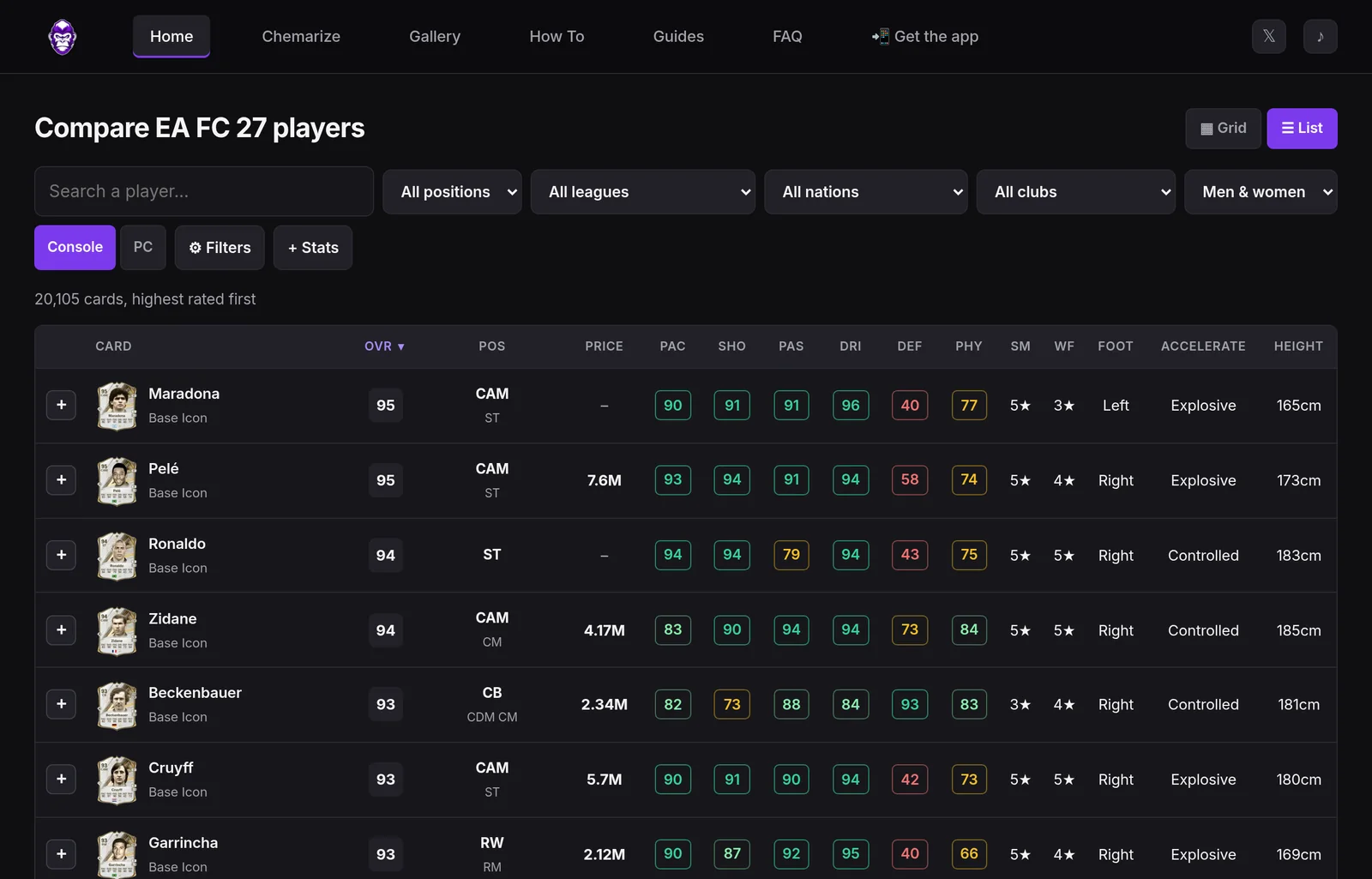
Every card, searchable
The home page is a list of every FC 27 card, a little over 20,000 of them. Each row shows the face stats, skill moves, weak foot, preferred foot, AcceleRATE, height and live coin prices for console and PC.
- Sort any column by tapping its header.
- Filter by position, league, nation, club and gender.
- Open Filters for a minimum and maximum on any face stat or any of the 29 in-game stats. For example: “strikers with 90+ Agility under 20K, sorted by Pace”.
- Add up to eight in-game stats as extra columns.
- Every search lives in the page address, so it can be bookmarked or shared.
If you prefer pictures, a card grid is one tap away, and the site remembers which view you like.
Compare
Pick two cards and FutComp puts them side by side on a radar chart, with every face and in-game stat, the price difference, and an EVO mode where you can edit stats to preview an Evolution. You can save that Evo and use it across the site.
Every comparison also asks “Who would you pick?” After you vote, you see how other FutComp players voted.
Find Similar
Choose a card and FutComp finds cards with stats close to it, cheapest first. The rules are yours to set: any face or in-game stat, how close it has to be (within ±N, or “this good or better”), the rating range and position. A typical find is a 650-coin card with nearly the same face stats as one costing 20K.
Squad builder and Chemarize
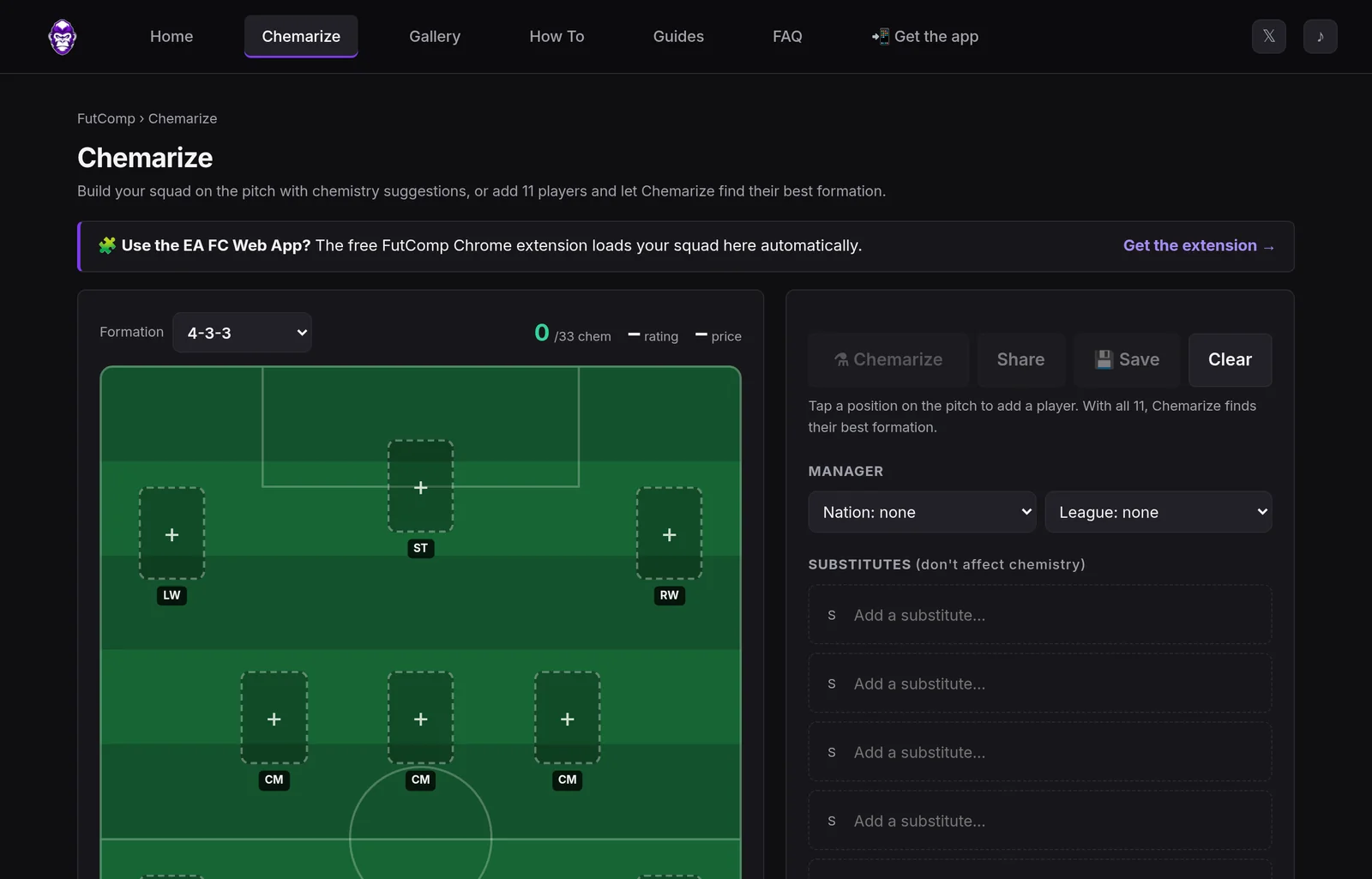
The squad builder is a pitch you build on:
- Pick a formation and tap a position to add a player.
- Drag players between positions to move or swap them.
- Watch chemistry, squad rating and price update as you go.
Each position offers suggestions three ways: Best chemistry (players who link with the squad you already have, showing how much they’d add to the squad total), Highest rated and Cheapest. A max-price box and search are there too.
Chemarize turns it around. With 11 players placed, it checks all 29 formations and every way your players can fit into each one, then shows the formation with the most chemistry. It also suggests a manager if one would push chemistry higher.
Squads can be saved, shared as a link, or shared as a ready-made image for X, WhatsApp or Instagram.
Custom cards
Evolutions change a player’s rating, stats and positions, so their old card no longer fits. The card maker rebuilds the card from a catalogue of blank card designs (Gold, TOTW, Future Stars, Icon and more), the player’s face and your details: rating, positions, stats, skill moves and weak foot. Your custom card then appears on your squad and in the image you share.
Gallery planner
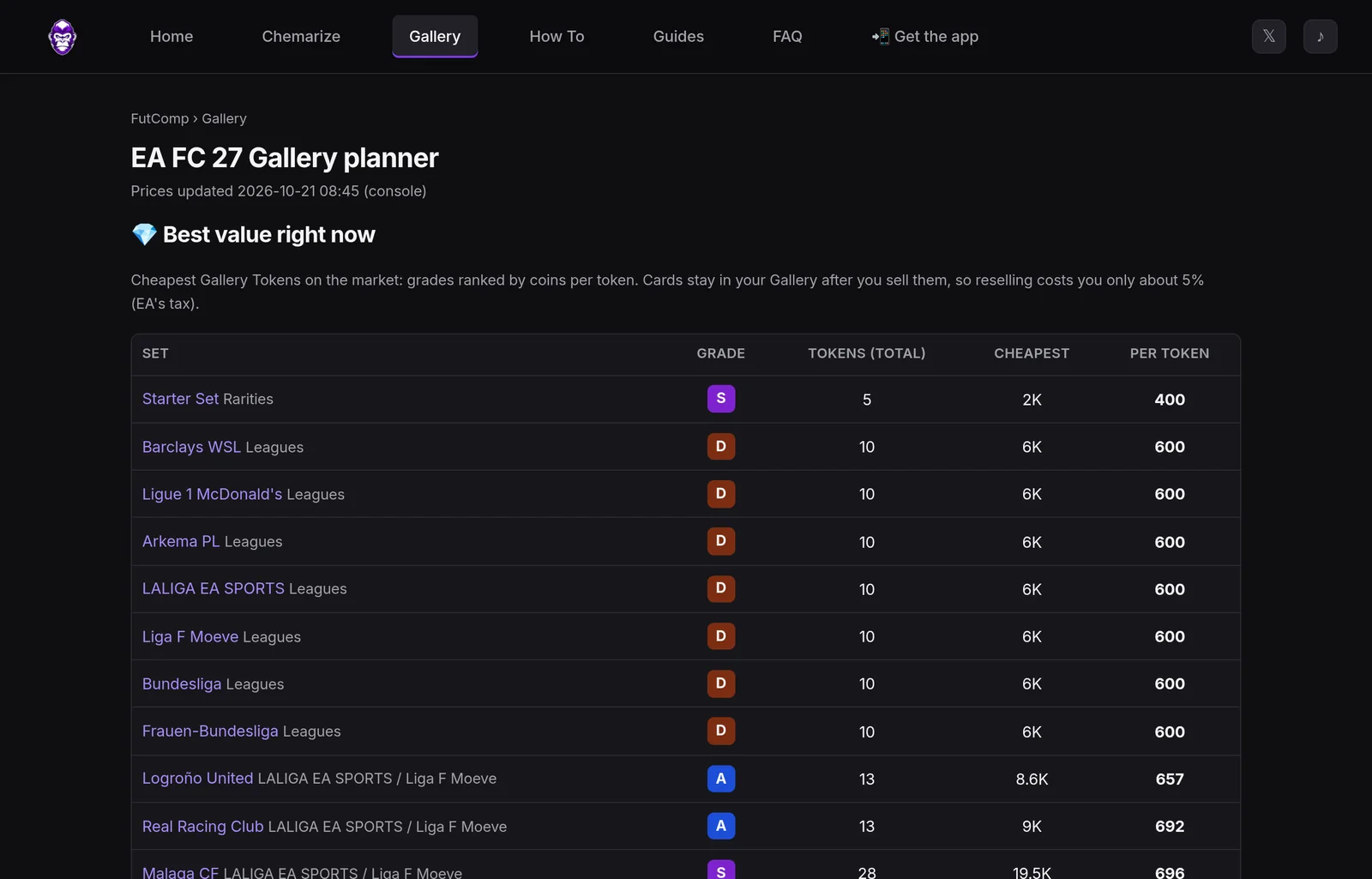
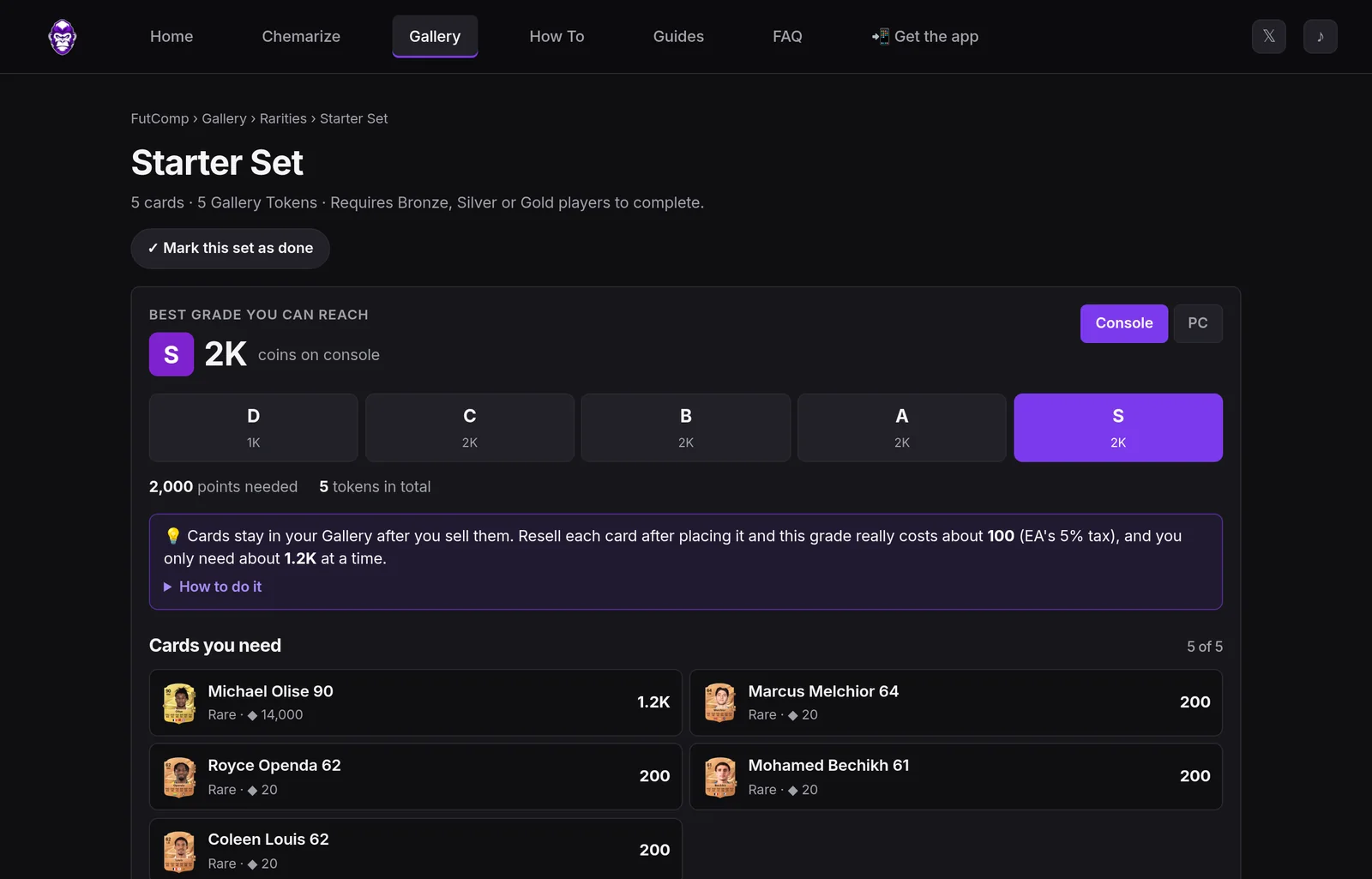
FC 27’s Gallery rewards you for collecting sets of cards. Each of the 128 sets has grades from D to S, and every grade has a points target. Players kept asking the same things, so every set page leads with three answers:
- The best grade you can reach, and what it costs on console or PC.
- The exact cards you need. If you add cards you packed yourself (“First Owner” cards), the list splits into You have and Buy.
- The real cost. Cards stay in your Gallery after you sell them, so if you buy, place and resell each card, a grade costs roughly EA’s 5% sales tax rather than the full price. The page shows that number, and how many coins you need at any one time.
The Gallery home ranks sets by coins per Gallery Token, lets you search sets, and lets you mark sets as done to hide them.
Guides, player pages and community
- Guides: “best of” lists such as fastest players, best finishers and 5-star skillers, updated daily.
- Player pages: every card has one, with full stats, similar cards and a community rating out of 10 with tags like Feels fast or Worth the coins.
The app and the Chrome extension
- The app: FutComp installs on a phone as an app (a Progressive Web App), with no app store needed.
- The Chrome extension: it adds a quick Compare to the browser toolbar and works alongside EA’s own Web App:
- it reads your current squad and Chemarizes it in the popup
- it plans every Gallery set around the cards in your club
- it only ever reads; it never sends anything to EA
The architecture
FutComp is deliberately plain: a Python web app, a MySQL database, scheduled jobs that keep the data fresh, and hand-written JavaScript in the browser, with no front-end framework.
Keeping the data fresh
FutComp builds its database from publicly available FC 27 card and market data. Scheduled jobs keep it current:
| When | Job | What it does |
|---|---|---|
| Daily 18:30 | Player sync | New cards and updated stats |
| Daily 19:45 | Chemistry and card-art sync | Positions, clubs, leagues, nations, chemistry flags, card faces and the blank-design catalogue |
| Daily 20:05 | Gallery sync | Every Gallery set, its rules, grades and rewards |
| Every 30 min | Price sync | Console and PC prices for every card, plus a price-history row whenever a price changes |
| Every 30 min | Gallery plans | Recalculates the cheapest route to every grade of every set, on both platforms |
| Nightly | Housekeeping | Thins out old price history, clears expired data |
Each job runs under a lock, so a slow run never overlaps the next one.
The server
- The app: a Flask application in Python behind Apache, run with mod_wsgi in its own long-lived processes.
- Server-rendered pages: the important pages are rendered on the server with Jinja templates, so search engines see real content. The browser then takes over for sorting, filtering and building.
- The database: MySQL holds cards, stats, chemistry data, prices and price history, Gallery items, card art, community votes and contact messages.
- Images: card images and card-art pieces are fetched once, cached on disk and served from FutComp’s own domain.
Caching, which turned out to matter a lot
The hot data is held in memory by the app itself:
- every card’s stats
- the chemistry data used for squad suggestions
- the stats Find Similar searches
- the pre-computed Gallery plans
Find Similar, for example, packs every card’s stats into a compact block of bytes (about 1.3 MB for all cards), so a custom search across 20,000 cards takes milliseconds.
The front end
Plain JavaScript and CSS, with a shared theme. The radar chart, the pitch, the squad share image and the custom cards are all drawn on an HTML canvas. Every interactive element is built and tested for touch as well as mouse.
The Chrome extension
The extension uses Manifest V3. A content script on the EA Web App watches the responses the Web App already receives (your squad, your club cards) and keeps only what FutComp needs: card IDs, ratings, positions, and an owner count to spot First Owner cards. It ignores transfer market and watchlist screens, because those cards aren’t yours. It never makes a request to EA.
The hard parts
Chemistry is a search problem
FC 27 chemistry looks simple: club, league and nation links, plus a manager bonus. What makes it hard is that a player only earns chemistry, and only counts towards anyone else’s links, when he’s in one of his own positions. So the best formation depends on which players are in position, and that depends on the formation.
Chemarize handles this per formation:
- It uses bitmasks to represent which of your 11 players are in position.
- For each group, it uses bipartite matching to check whether that group can actually take different slots they can all play.
- It keeps only the groups that can’t fit another player, then scores each with the chemistry rules.
- Across 29 formations it ranks the results, preferring placements where players are in their main position.
All of this runs in your browser in a fraction of a second. The squad builder’s suggestions reuse the same engine: for each candidate, it calculates the whole squad’s chemistry with that player in the slot.
The Gallery is an optimisation problem
Finding the cheapest set of cards that reaches a grade sounds like “buy the best value cards”. The bonus tags break that, because many of them only kick in at a card-count tier:
- “5+ Silver cards: +15%”
- “two versions of the same player: +10%”
- “First Owner: +150% at 5, +300% at 10, +500% at 20”
A cheaper lineup that triggers a tag can beat a pricier one that doesn’t.
The planner works in stages:
- Coins-per-point pick: it starts from the best coins-per-point lineup, tuning a single trade-off number until the lineup reaches the target.
- Downgrade pass: it swaps expensive cards for cheaper ones while the set still reaches the grade with tags included.
- Hill-climb: when only a tag combination can reach a grade, a search finds it.
- First Owner variants: with First Owner cards, it also tries locking in 5, 10 or 20 of them and keeps whichever plan is cheapest.
A two-second fix that was really a server problem
When the list view launched, searches took nearly two seconds, even though the search itself took 25 to 65 milliseconds. The app was running inside every one of Apache’s worker processes, each with its own empty cache, so most requests paid to rebuild it. Moving FutComp into a small set of dedicated, long-lived processes brought responses down to about 70 milliseconds. Find Similar, the Gallery planner and the extension all sped up with it.
Custom cards need your own domain
A canvas can only export an image if every picture drawn on it comes from the same domain. So the card maker’s artwork (blank designs, faces, badges) goes through a small FutComp image route. That route only accepts card-art paths and caches every image on disk. Text colour is chosen by measuring how light the design is behind the name and stats.
Mobile and search engines
Most visitors arrive on a phone, often from a link in a search engine or an AI assistant’s answer. That meant:
- No sideways scrolling, except on deliberately wide tables.
- Phone layouts for wide data: tables become cards on phones, and filters move into a full-screen sheet.
- Fixed bars: the compare bar is pinned to the bottom of the screen and only appears once you pick a card.
- One address per page, with redirects for the alternatives, a clean sitemap of about 20,000 pages, and a plain-text
llms.txtdescribing the site for AI crawlers. - The tool comes first: the descriptive text search engines want sits below each tool, so the page reads as a tool, not a blog post.
Privacy without accounts
There are no accounts, so personal things stay in the browser. Community voting still needs protection from vote-stuffing:
- each browser gets a random anonymous cookie, stored only as a scrambled code
- votes are only accepted from the site itself
- there’s an hourly limit per connection, using a scrambled code made from the IP address, which is deleted after 30 days
How players use it
- “Is this card worth it?” Search the card in the list, tap + on it and on the alternative, and compare stats and price side by side.
- “Same stats, fewer coins.” Open a card in the grid, choose Find Similar, loosen the rules if needed, and sort by cheapest.
- “Best formation for my team.” Open Chemarize, add your 11 (or let the Chrome extension load them from the Web App), and tap Chemarize.
- “Build around one player.” Put him on the pitch, then tap each empty position and pick from Best chemistry.
- “Show off my Evo.” Save the Evo, tap Customise card, pick a design, and share the squad image.
- “Which Gallery set next?” Open the Gallery, check Best value right now, open a set, and follow its card list. Mark it done when you’re finished.
Tools and stack
- Language and server: Python 3, Flask, Jinja2, Apache 2.4 with mod_wsgi
- Data: MySQL,
mysql-connector-python,requestsfor the sync jobs, Pillow for measuring card designs - Scheduling: cron, with
flockso jobs never overlap - Front end: plain JavaScript, CSS custom properties for the theme, the Canvas API for charts, pitches, share images and custom cards
- App: a Progressive Web App (web manifest and service worker)
- Browser extension: Chrome Manifest V3, read-only content scripts
- Testing: Playwright, driving real Chromium at phone and desktop sizes, including touch and drag-and-drop
- Hosting and security: Let’s Encrypt certificates, key-only SSH, a firewall and fail2ban
- Analytics: Google Analytics, used to see which features people use
- Development: built with Claude Code as a pair programmer
What’s next
- Trading: FutComp has been recording every price change since mid-October. Once a few weeks of history have built up, it becomes price graphs on every player page, plus a Trading section with risers and fallers.
- SBC solutions, in the same spirit as the Gallery: the cheapest way to complete each Squad Building Challenge, using your own cards first. It will suggest only, never submit.
What it says about how we work
FutComp looks like a fan site and is really a data product: scheduled pipelines, in-memory caches, a combinatorial chemistry engine, a cost optimiser and a browser extension, all tuned for a phone. It’s the same approach we bring to client work — find the hard part, solve it properly, and keep everything around it simple.
If your project has a hard part like that, we’d like to hear about it.
FutComp is an independent fan project and isn’t affiliated with or endorsed by Electronic Arts. EA SPORTS FC, FC 27 and Ultimate Team are trademarks of Electronic Arts Inc.